I had a Nintendo Switch for about three years, and recently I decided to sell it. When I stopped to look at what I was actually playing on it, I noticed a clear pattern: I was spending almost all my time buying and playing retro titles or indie games with a pixel-art aesthetic. It just didn’t make sense to keep a console of that size and price just for that.
On top of that, my experience with the Switch wasn’t feeling great anymore. The device felt a bit sluggish, with long loading screens and slow transitions. Even in first-party games like Pokémon Legends: Arceus, it felt like everything took forever to happen. What I really missed was the cozy, pick-up-and-play feel of classic handhelds, especially the Game Boy and Game Boy Advance.
Before buying a dedicated retro handheld, I tried to improvise. I downloaded emulators on my iPhone and iPad (like Delta) and paired them with a USB controller I already had from the Switch. In practice, the experience was pretty bad: touch-screen controls just don’t work for me, and having to carry around an iPad and a separate controller everywhere defeated the whole point of portability. I needed something dedicated, compact, and ready to play on the couch, in bed, or while traveling.
Entering the world of retro handhelds (without joining a “cult”)
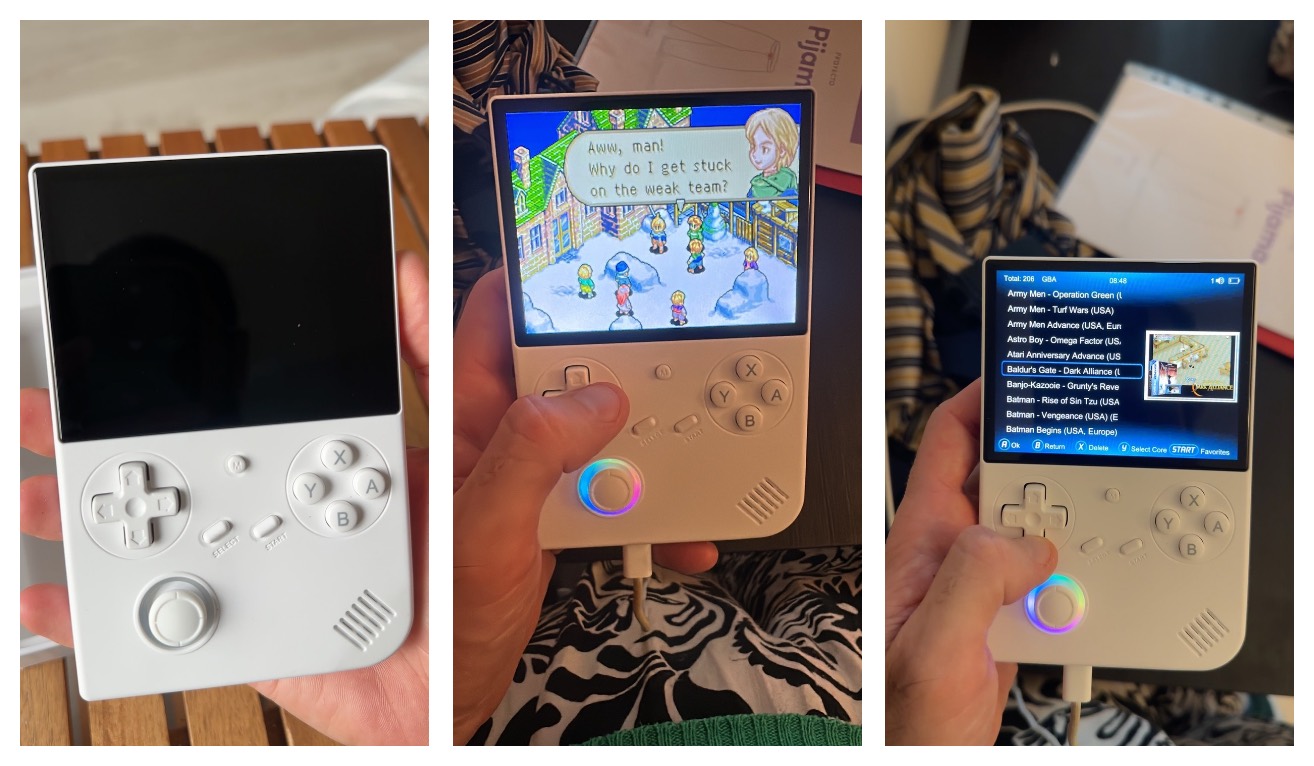
After watching hours of comparison videos covering Linux and Android devices, I bought the Anbernic RG40XXV via AliExpress. My main reference during this research was the TechDweeb YouTube channel. His videos capture the exact cozy, well-crafted vibe I wanted from this hobby.
I did a fair bit of research into custom firmware and tweaks, though I didn’t want to get obsessed with endless tinkering, the way people get sucked into deep rabbit holes like custom mechanical keyboards. I had no interest in joining a hardware “cult” of constant optimization. My goal was simple:
- Have a device that just works;
- Easily transfer my ROMs (ideally over Wi-Fi via Samba/FTP, or via USB);
- Pick it up, turn it on, and play.
My main focus has always been the Game Boy, with a very specific goal: finishing the games I never beat as a kid. Since English isn’t my native language, growing up I used to mash through every single dialogue box without understanding a word. Today, the biggest joy for me is replaying those classics while actually reading and appreciating the story.
From stock OS to Knulli: Wins, hassles, and lost saves
When the console arrived, it came with the stock operating system and a microSD card preloaded with games across several platforms (Atari, Game Boy, Game Boy Color, GBA, and even some PlayStation 1 titles). The factory OS is fairly intuitive: you turn it on, browse the menus, launch a game, and save. It works.
Every single guide online warns that the very first thing you should do is replace the stock microSD card, since the included ones are cheap, generic, and prone to corruption. I ignored that advice at first and jumped straight into Final Fantasy I (GBA). I put about 17 hours into it, playing blind without any walkthroughs, just exploring.
The thing is that character movement felt painfully slow, and the default emulator in that menu didn’t support fast-forward. Eventually, I realized there was a second game launcher on the device (via RetroArch) that allowed fast-forwarding, so I switched over and promptly lost my save file in the process.
I took that cold shower as a sign to do things properly: I bought a reliable microSD card, curated the ROMs I actually wanted to play, and followed TechDweeb’s tutorials to install Knulli OS (a Batocera-based custom firmware), even downloading the exact same theme he uses in his videos.
An honest heads-up about Knulli: flashing the image onto the card and booting it up for the first time is pretty painless. However, even for someone who works in tech, the post-install configuration is tedious and monotonous. If you aren’t in the mood to spend a day or two tweaking folders, themes, and settings, stick with the stock OS, as it gets the job done just fine.
Where things stand now
Almost two months in, I have zero regrets. I was a little worried this would become another impulse-buy gadget left gathering dust in a drawer, but it has fulfilled the exact role I hoped it would.
Right now, I’m playing Final Fantasy IX for PlayStation 1 (still on the first of four discs), and it runs like a dream. With fast-forward enabled to breeze through battles and transitions, I can enjoy the story at my own pace in short, casual sessions. Battery life holds up great for my routine, the buttons feel snappy and responsive, and the ergonomics of this vertical layout (with a single left analog stick alongside the D-pad) are super comfortable.
Even on days when I’m not diving into a massive RPG, being able to pick it up for 15 minutes to play a random Game Boy Advance title makes the purchase completely worth it.
Anbernic RG40XXV Technical Specifications
| Component | Specification |
|---|---|
| Display | 4.0-inch IPS (4:3), OCA full lamination, 640 × 480 resolution |
| Processor (CPU) | Allwinner H700 Quad-Core ARM Cortex-A53 at 1.5 GHz |
| Graphics (GPU) | Dual-Core Mali-G31 MP2 |
| RAM | 1 GB LPDDR4 |
| Storage | Dual microSD (TF) card slots, expandable up to 512 GB |
| Operating System | 64-bit Linux (compatible with CFWs like Knulli, muOS, MinUI) |
| Battery | 3200 mAh Li-polymer (estimated battery life of up to 6 hours) |
| Charging | USB-C (5V / 1.5A, compatible with C-to-C chargers) |
| Connectivity | Wi-Fi 2.4/5 GHz (802.11 a/b/g/n/ac), Bluetooth 4.2, Mini-HDMI output |
| Controls & Extras | D-pad, 1 left analog stick with RGB ring (16M colors), vibration motor, mono speaker, and 3.5mm headphone jack |
| Dimensions & Weight | 13.9 × 9.2 × 2.2 cm | ~216 g |
Links & Resources Mentioned
- Device: Anbernic RG40XXV
- Custom Firmware: Knulli OS (GitHub Releases)
- Theme: TechDweeb EmulationStation Theme
- YouTube Channel: TechDweeb
- iOS/iPadOS Emulator: Delta Game Emulator